


A business can pay for a fast internet connection and still have poor Wi-Fi.
The speed may look good beside the router while staff lose connection in the next room. Guests may connect but struggle when the property becomes busy. Cameras, payment devices and office laptops may compete with streaming traffic. When something fails, nobody knows whether the problem belongs to the internet provider, the router, the cabling or the Wi-Fi design.
Reliable business Wi-Fi is not one product. It is a system.

Start with the operation, not the router
The first question is not “Which router should we buy?”
It is “What must this network allow the business to do?”
A hotel may need guest access across rooms and outdoor areas, stable connectivity for reception and booking systems, separate cameras and staff devices, and a backup connection when the primary service fails.
An office may need video calls, cloud applications, printers, secure staff access and a controlled visitor network.
A retailer may depend on messaging, stock systems, payments, cameras and product demonstrations. Each activity has a different level of importance.
The network should reflect those priorities.
This is why a site visit matters. The same equipment can perform very differently in an open shop, a concrete multi-floor office and a hotel with rooms, gardens and busy shared areas.
Coverage and capacity are different
Coverage means a device can detect the Wi-Fi signal.
Capacity means the network can serve the devices using it at the same time.
A high-powered access point may cover a large open area and still perform poorly when dozens of phones connect. Every connected device shares airtime. Walls, floors, neighbouring networks, distance and device quality all affect the result.
This is why adding one “stronger” router often fails to solve a larger property. The right design may use several correctly positioned access points, wired backhaul where practical and controlled radio power so devices move between access points cleanly.
Aim for predictable service where the business needs it, rather than the greatest possible number of Wi-Fi bars.
Separate guests from the business
Guest phones should not sit on the same unrestricted network as staff laptops, cameras, printers or operational devices.
A business network normally needs distinct zones:
- business operations
- employee devices
- guest access
- cameras and connected equipment
- network administration
The exact design depends on the property and equipment, but the principle is consistent: access should match purpose.
Separation improves security, makes troubleshooting easier and prevents one type of traffic from overwhelming everything else. A guest streaming video should not affect reception’s ability to confirm a booking. A compromised visitor device should not be able to discover business systems.
Read why guest Wi-Fi and staff systems need separate networks before giving visitors the same password used by the office.
Internet redundancy must be designed
A second internet connection is useful only if the network can use it correctly.
The business needs to decide:
- which connection is primary
- which connection is backup
- whether failover is automatic
- which systems keep priority during backup operation
- how the team knows a failure occurred
- how service returns to normal
- whether both connections depend on the same upstream infrastructure or power source
Two provider contracts do not automatically create resilience. The paths, equipment, power and configuration matter.
For a business that depends on constant connectivity, the recovery path should be tested rather than assumed.
The backup internet guide for businesses in The Gambia explains provider diversity, failover, traffic priorities and testing in more detail.
Power is part of the network
The internet cannot remain available if the equipment delivering it loses power.
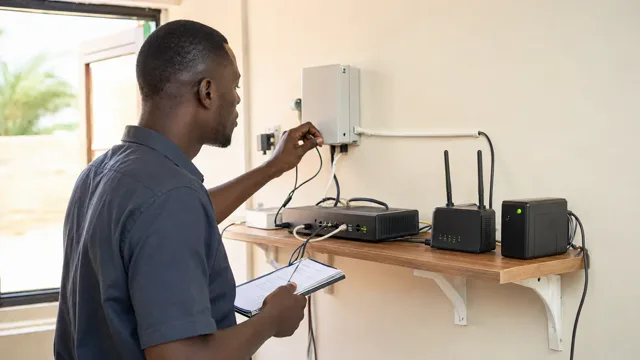
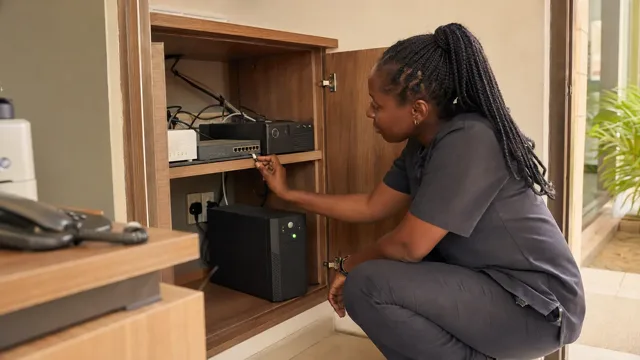
Routers, controllers, switches, access points and provider equipment may all be part of the path. Protecting only one router can create a false sense of continuity if another required device shuts down.
A practical design identifies the critical chain, measures its load and provides the appropriate level of backup power. The objective may be a few minutes for safe continuity, enough time for a generator to start, or several hours for essential services.
The answer should be based on the operation, not an arbitrary battery size.
Use the power continuity guide to define what must remain online and for how long.
Management matters after installation
A network is not finished when the installation team leaves.
Someone should know:
- what equipment is installed
- where it is located
- which accounts administer it
- how networks and access are separated
- which internet services are connected
- when configurations were last backed up
- what changed when a fault began
- who is responsible for support
The business should control its own accounts and documentation. A supplier may administer the environment, but the business should not become trapped because only one technician knows the password or design.
What a professional Wi-Fi assessment should include
A useful assessment examines:
- The physical site, walls, floors and outdoor areas.
- The number and type of users and devices.
- Critical applications and traffic priorities.
- Existing internet services, cabling and power.
- Current equipment and its limitations.
- Coverage, interference and congestion.
- Security zones and access requirements.
- Backup connectivity and recovery behaviour.
- Administration, monitoring and documentation.
- A phased implementation plan.
The result needs to explain what changes and why. A shopping list on its own is not a network design.
The result a business needs
Business Wi-Fi should be treated as operating infrastructure.
It connects customers, staff, systems, cameras and services. When it is designed around the real operation, the business gains more than a stronger signal. It gains continuity, control and a platform that can grow.
Palmward designs connectivity around the complete path: internet, network, Wi-Fi, power, separation, monitoring and recovery.
The result is simple: the right connection in the right place for the right work, plus a clear response when something fails.

.jpg)